

체험기 파일럿 설치 안내
-
About
These missions are aimed towards players who are new to DCS and fairly new to flight sims
in general, and so attempt to strike a difficult balance between accessibility (avoiding
information overload) and covering everything important. However, I also recommend
these to anyone interested in becoming more proficient in the F-15. They're generally
intended as a supplement to the DCS F-15C manual, but I also go over some aspects that are
undocumented (i.e., not in the manual), such as autopilot operation and air-to-air refueling.(This material is not made or supported by Eagle Dynamics SA.)






-
Supplementary Notes
The following notes cover material from the training missions that are not included in the official F-15C manual, and are intended as a supplement to the manual.
Last updated 1 February 2021
Table of Contents
- Cockpit and Controls
- Cold Start and Taxi
- Autopilot
- Navigation
- Landing
- TEWS
- Radar
- Basic BVR Tactics
- Gunnery
- Air-to-Air Refueling
-
조종석 명령키 (Cockpit and Controls)
- 시선 변경키 (View controls)
- 조종석 둘러보기: (You can look around using the following commands:)
키패드(Numpad) 8: 위로보기 (View up)키패드(Numpad) 2: 아래 보기 (View down)Numpad 4: View leftNumpad 6: View rightNumpad 5: Center viewNumpad *: Zoom inNumpad /: Zoom out
- Various views can be selected - a few examples:
F1:: Cockpit viewF2:: External viewLeft Ctrl+F4: Chase view
- 조종석 둘러보기: (You can look around using the following commands:)
- Pause
- You can pause by pressing the
Pausekey.
- You can pause by pressing the
- Throttle
- The highest throttle setting before afterburner kicks in is referred to as "MIL" or "military power."
- Speed brake
- If you want to slow down quickly, you can use the speed brake, which is a large plate on the top of the fuselage that hydraulically deploys into the airstream.
Left Shift+B: Extend speed brake (press again while extending to stop extending partway)Left Ctrl+B: Retract speed brake (press again while retracting to stop retracting partway)B: Toggle speed brake fully extended/retracted- A “SPD BK OUT” light on the caution lights panel indicates the speed brake is extended. You will also generally hear increased wind noise, and see the extended speed brake in your center rear-view mirror.
- 시선 변경키 (View controls)
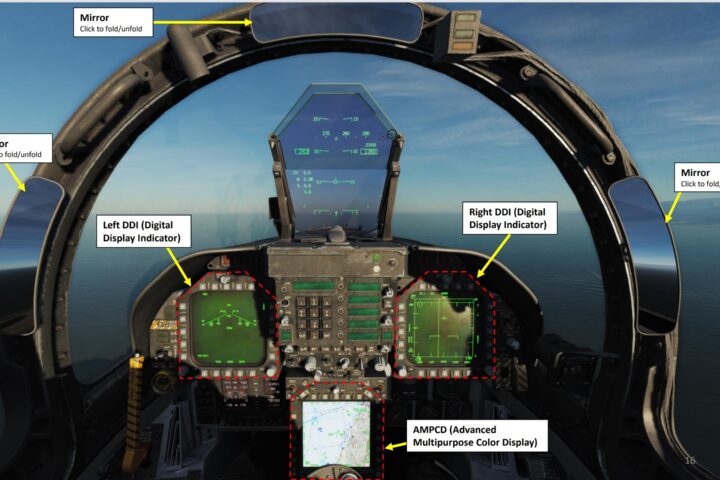
-
- Clock
- You can set a timer using the little hand in this clock display by pressing
Left Shift+Tto start/stop/reset.
- You can set a timer using the little hand in this clock display by pressing
- HUD color/brightness
Right Alt+Right Shift+H: Decrease HUD brightnessRight Ctrl+Right Shift+H: Increase HUD brightnessRight Ctrl+H: Cycle HUD color options
- Kneeboard
- Your kneeboard contains maps of all airfields in the region, as well as mission-specific information (typically a map of your waypoints).
K: Kneeboard glance viewRight Shift+K: Toggle kneeboard on/off[: Previous page]: Next page- Additional commands are available to mark and navigate between shortcuts in the kneeboard pages—see the "Kneeboard" category in the controls setting menu.
- Clock
-
Cold Start and Taxi
- Abbreviated start-up checklist
- You can look around using the following commands:
- Electrical power - ON (Right Shift+L)
- Throttles - OFF
- Engines - START (Right Shift+Home)
- Canopy - CLOSE (Left Ctrl+C)
- Navigation mode - ACTIVATE (1)
- Flaps - DOWN (F)
- Thorough start-up checklist
- Electrical power - ON (Right Shift+L)
- Anti-collision lights - ON (Right Alt+Right Ctrl+L)
- Anti-collision lights are flashing red lights on your wings and tail. Turning these and your navigation lights on will warn the ground crew that you're about to start your engines, and when you're taxiing, will make you more visible and reduce the chance of a collision.
- Navigation lights - ON (Right Ctrl+L)
- Navigation lights (also called position lights) are red and green lights that mark the left and right sides of the aircraft.
- Throttles - OFF
- Interior lights controls - AS REQUIRED (L)
- Request start-up clearance
- Press \ to open the communications menu.
- Press F5 to select ATC (air traffic control).
- Press the key to select your airbase (typically F1).
- Press F3 to request startup.
- Wait for clearance.
- Engines - START (Right Shift+Home)
- Canopy - CLOSE (Left Ctrl+C)
- Fuel quantity gauge - CHECK
- BIT - CHECK
- Check that the fuel gauge is functioning properly by turning the dial to "BIT" by holding Left Alt+Left Ctrl+D. ("BIT" stands for "Built-In Test.") The pointer and top counter should both indicate 6000 lb, and the left and right counters should both indicate 600 lb.
- Bingo bug - SET
- The caret is on the fuel quantity gauge is the "bingo bug," which indicates when you've got just about enough fuel to return home. It's set at 3000 lb by default, which is a reasonable rule of thumb, but you can adjust it for your particular flight plan if you'd like by pressing Left Ctrl+D and Left Alt+D.
- BIT - CHECK
- Navigation mode - ACTIVATE (1)
- Flaps - DOWN (F)
- Trim - CHECK AND SET
- T/O trim button - PUSH (Left Alt+T)
- T/O trim light - ON
- Landing/taxi light switch - AS REQUIRED
- Pressing Right Alt+L will cycle your gear light between the off, taxi, and landing settings (so if you're starting with it off, pressing it once will switch it to "taxi").
- You can look around using the following commands:
- Taxi
- First, request taxi clearance.
- Press \ to open the communications menu.
- If necessary, navigate through the menus to the ATC menu for your airbase.
- Press F1 to request taxi to runway.
- When you get clearance, ATC will direct you to a specific runway. The runway number is the first two numbers of the heading of the runway (e.g., “runway 13” has a heading of about 130 degrees, which is southeast).
- Nose gear steering is used to steer while taxiing. In the normal range, the nose gear will turn 15 degrees left or right; by holding down S, you'll temporarily switch to the maneuvering range, which gives up up to 45 degrees left or right steering for tighter turns.
- Your ground speed is displayed in the bottom-left of the VSD, after the letter "G." Taxi speeds are too slow for the airspeed readout on the HUD to be reliable, so you should refer to your ground speed readout instead. Stay under 30 knots while taxiing, and slow down to 10 knots when turning.
- Come to a stop before the taxiway meets the runway and request takeoff clearance from ATC via the communications menu (\). If the runway is clear, ATC will clear you for takeoff, and also turn the runway lights for you. Typically when giving takeoff clearance, ATC will tell you "climb 300," which means when taking off, you should continue straight on the runway heading until you reach an elevation of 300 meters (1000 feet)
- First, request taxi clearance.
- Abbreviated start-up checklist
-
Autopilot
- The F-15C has two autopilot modes: attitude and altitude hold. Attitude hold will hold the current attitude (that is, the orientation of the aircraft), as long as the pitch attitude is within ±45° and the roll attitiude is within ±60°, and the G loading is between 0g and +4g. As long as you stay within these limits, you can adjust the attitude with the stick with autopilot engaged; when you release the stick, the new attitude will be held. Attitude hold alone is useful, for example, during a long climb. However, when attitude hold is engaged, the second mode, altitude hold, can also be engaged, as long as the climb or descent rate is less than 2000 ft/min. If you exceed any of these limits, the respective autopilot mode will automatically disengage.
- To toggle attitude hold, press A.
- To toggle altitude hold, press H.
- The autopilot modes are engaged by the highlighted switches on the left console. When these switches are switched forward, the respective autopilot mode is activated.
Who We Are
A Team That Loves to Create
Lorem ipsum dolor sit amet, consectetur adipiscing elit. Maecenas aliquet laoreet felis id tristique. Duis efficitur, augue a condimentum placerat, tortor nibh maximus neque, eu eleifend tortor urna in odio. Maecenas ultrices dolor a nulla cursus, ut consequat purus volutpat. Donec pellentesque ligula enim, sed luctus ex posuere eu. Pellentesque odio lorem, posuere vel magna vitae, suscipit commodo nisl.
Proin elementum neque et tempor viverra. Suspendisse in ante tristique, facilisis tellus at, commodo augue. Mauris quis sapien accumsan, dapibus ex nec, ultricies nunc. Duis eu enim sit amet sapien scelerisque placerat. Fusce rutrum iaculis hendrerit. In aliquet, nibh at egestas pharetra, nulla nisi molestie nisl, nec interdum ex purus maximus felis.
Let’s work together! Drop us an email to get started!
What We Do
Keep It Simple
Lorem ipsum dolor sit amet, consectetur adipiscing elit. Maecenas aliquet laoreet felis id tristique. Duis efficitur, augue a condimentum placerat, tortor nibh maximus neque, eu eleifend tortor urna in odio. Maecenas ultrices dolor a nulla cursus, ut consequat purus volutpat. Donec pellentesque ligula enim, sed luctus ex posuere eu. Pellentesque odio lorem, posuere vel magna vitae, suscipit commodo nisl.
Proin elementum neque et tempor viverra. Suspendisse in ante tristique, facilisis tellus at, commodo augue. Mauris quis sapien accumsan, dapibus ex nec, ultricies nunc. Duis eu enim sit amet sapien scelerisque placerat. Fusce rutrum iaculis hendrerit. In aliquet, nibh at egestas pharetra, nulla nisi molestie nisl, nec interdum ex purus maximus felis.
Wanna see proof? Check out our work!
-
Business Consulting with Limitless Potential
From resource planning and conflict management to strategic planning and market research, our experts offer the best advice.

dreamer
디지털 비행을 쉽고 재밌고 유익하게 즐길 수 있도록 연구하고 메타파일럿의 세계로 안내합니다.